

--block-net instead installs a static kernel filter and does not start a proxy.
The same proxy can also be run on its own with nono proxy — a foreground server with no sandboxed child — so you can point external workloads (containers, microVMs) at nono’s domain filtering and credential injection.
Common cases
Proxy Modes
The proxy supports three modes that can be combined in a single session:
When domain filtering or credential injection is active, the proxy starts automatically.
HTTP_PROXY and HTTPS_PROXY are set in the child environment. For Node.js 26+, nono also sets NODE_USE_ENV_PROXY=1 so built-in fetch() reads HTTPS_PROXY.
A 256-bit session token is generated for each proxy session. The child must include it in every request (Proxy-Authorization header for CONNECT, X-Nono-Token for reverse proxy), preventing other localhost processes from using the proxy.
Blocking All Network
io_uring_setup(), closing the UDP gap in Landlock’s TCP-only network controls. Consequently, programs using io_uring solely for file I/O also need to disable that feature when run with --block-net.
In a profile, set network.block to true:
CONNECT Tunnel (Domain Filtering)
The CONNECT tunnel is the most common proxy mode. It validates outbound hostnames against an allowlist, then relays raw TCP bytes. TLS is end-to-end between the sandboxed process and the upstream server — the proxy never sees plaintext.--allow-domain is an HTTP(S) proxy allowlist, not a generic raw TCP host:port allow. When domain filtering is active, direct outbound connections are blocked and traffic must go through the proxy.
--allow-domain is given a URL with a path (e.g., https://github.com/org/**), only requests matching that path pattern are allowed for that domain. Requests to other paths on the same domain receive 403 Forbidden. A plain hostname (e.g., api.openai.com) allows all paths on the domain.
Use nono why --self --host https://github.com/some/path inside the sandbox to check whether a specific URL is permitted and see the configured endpoint rules.
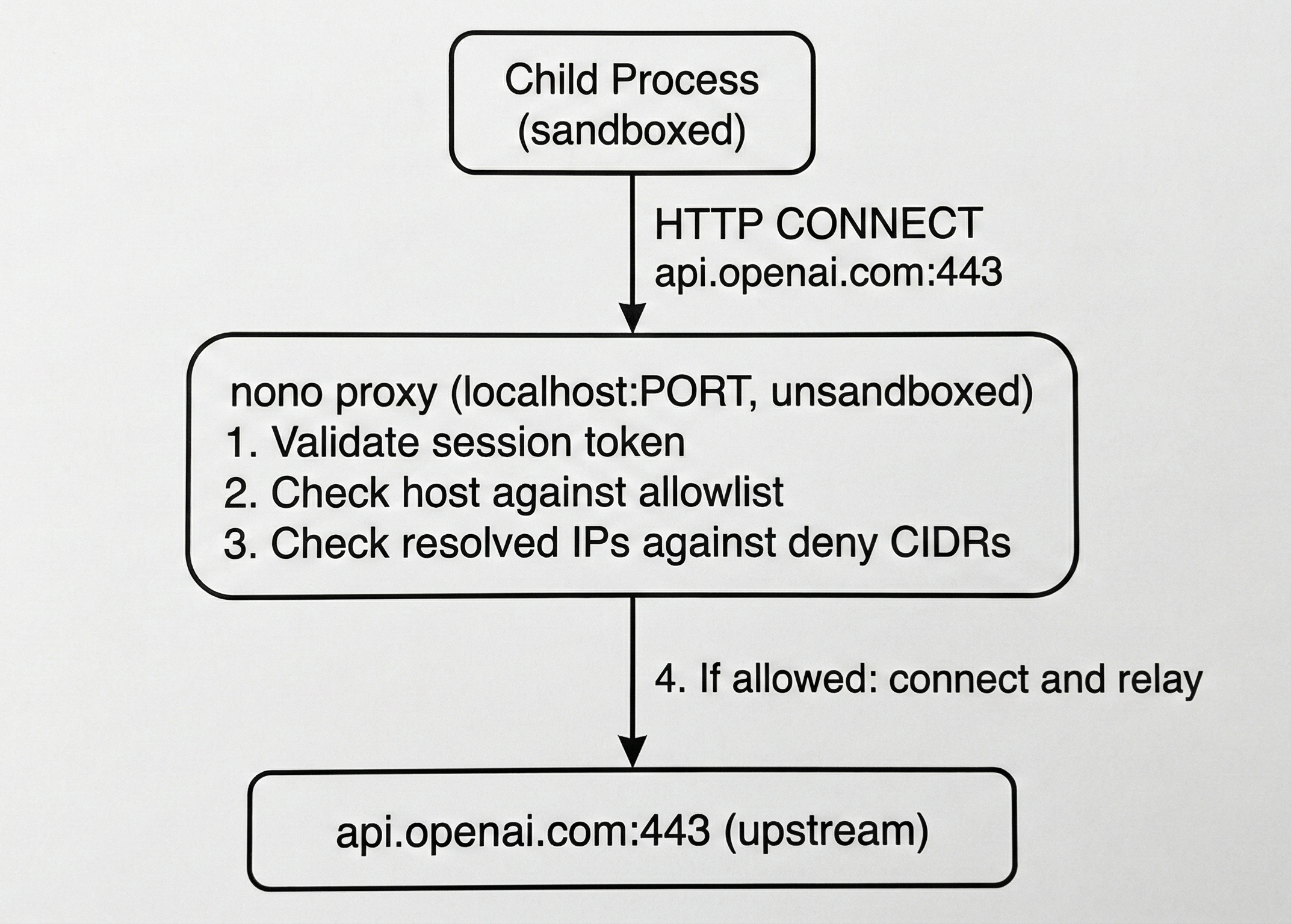
DNS Rebinding Protection
The proxy resolves DNS itself and checks all resolved IPs against the deny list before connecting. This prevents DNS rebinding attacks where a malicious DNS server maps an allowed hostname to an internal IP.Proxy Port
By default the proxy binds to an OS-assigned ephemeral port. Use--proxy-port to fix it when the application requires a known port:
OPENAI_BASE_URL, ANTHROPIC_BASE_URL, etc. from the environment don’t need --proxy-port — nono sets these automatically.
Network Profiles
Network profiles are named sets of allowed domains composed from groups. They are defined innetwork-policy.json (embedded in the binary) and activated with --network-profile or via a profile’s network.network_profile field.
Preset Network Profiles
Groups
Each group maps to a set of allowed hostnames and wildcard suffixes:Adding Domains
Use--allow-domain on the command line or allow_domain in a profile to add domains on top of the network profile:
allow_domain/deny_domain entries support three wildcard forms:
- A bare
*matches any host. - A leading
*.matches one or more subdomain labels:*.example.commatchesa.example.comanda.b.example.com, but notexample.comitself. *occupying a whole label anywhere else matches exactly one label there:jenkins.*.ci.example.commatchesjenkins.prod.ci.example.com, but notjenkins.ci.example.com(missing label) orjenkins.a.b.ci.example.com(extra label).
* that only occupies part of a label (foo*bar.com), or a leading *. combined with another * elsewhere in the same pattern, can never match a real hostname — these are rejected at profile load time rather than silently matching nothing.
Denying Domains
deny_domain blocks specific hosts through the proxy even when they’d otherwise be allowed — it’s checked before the allowlist, so it can carve an exception out of a broad allow_domain or network_profile entry:
--deny-domain is the CLI equivalent. deny_domain is additive across profile inheritance, same as allow_domain.
Client-Side Proxy Bypass
Profiles can add host patterns to the generatedNO_PROXY and no_proxy environment variables with network.no_proxy. nono still emits loopback defaults and any safe direct-connect bypasses first; parent-shell NO_PROXY values are not inherited. These entries do not grant network access; on macOS ProxyOnly and other restricted modes, direct connections still require matching sandbox permissions.
host:port values. Bare multi-label domains and protected metadata suffix tokens are rejected because common clients treat them as suffix matches; use a safe single-label local alias like redis, a canonical IP literal, or an explicit suffix pattern such as .internal.example. Patterns conflicting with proxy-allowed hosts or credential/L7-filtered route upstreams fail configuration so that traffic stays on the local nono proxy.
Generated NO_PROXY / no_proxy values use common environment-client syntax, so profile *.internal.example is emitted as .internal.example. nono also emits NONO_NO_PROXY with canonical nono patterns, preserving forms such as *.internal.example, so wrappers can translate them to runtime-specific formats like Java http.nonProxyHosts.
Reverse Proxy (Credential Injection)
When--credential is active, the proxy runs a reverse proxy alongside the CONNECT tunnel. The sandboxed process sends plain HTTP requests to http://localhost:<port>/<service>/..., and the proxy injects the real API key and forwards to the upstream over TLS.
External Proxy (Enterprise Passthrough)
For corporate environments with a mandatory outbound proxy, chain domain-filtered traffic through it with--upstream-proxy. This is typically paired with the enterprise network profile:
Bypassing the External Proxy
Some domains may need to bypass the upstream proxy and connect directly:*. wildcard suffixes (case-insensitive). Matching hosts route directly; everything else goes through the upstream proxy.
This can also be configured in a profile:
Standalone Proxy (nono proxy)
nono run / shell / wrap start the proxy as a side effect of launching a sandboxed child, wiring HTTP_PROXY/HTTPS_PROXY and the session token into that child. nono proxy instead runs the same network-filtering / credential-injection proxy as a foreground server with no sandboxed child, prints the connection details, and blocks until you press Ctrl-C.
This lets you point your own tools at nono’s domain filtering and credential injection, useful for workloads that provide their own OS-level isolation, such as Docker containers, Kata Containers, Kubernetes pods, Firecracker, and gVisor. The workload routes its egress through the proxy via HTTP(S)_PROXY while isolation comes from the container/microVM runtime.
HTTP(S)_PROXY exports, a summary of configured routes, and — when TLS interception is active — the trust-bundle path:
--profile and extended/overridden by explicit flags, reusing the same configuration machinery as the sandboxed path. Allow-domains and credentials are merged on top of the profile; the network profile and upstream proxy are overridden by flags. Credential injection for known services and cmd:// credential-capture routes carry through the profile exactly as they do under nono run.
Flags
Reusing a CA across runs
By default eachnono proxy run mints a fresh ephemeral CA, so any client that trusts the intercepted TLS has to re-trust a new certificate every time. To keep one CA across runs — trust it once in your clients, containers, or microVM images — supply your own with --proxy-ca-cert and --proxy-ca-key:
-----BEGIN PRIVATE KEY-----); the certificate must be a CA certificate in PEM. Generate a pair with OpenSSL:
--proxy-ca-cert cannot be combined with --proxy-ca-validity; on macOS it also cannot be combined with --trust-proxy-ca, which manages its own CA in the Keychain. Protect the key file — anyone who can read it can mint certificates your clients will trust.
TLS interception (and therefore the CA) only activates when a route requires layer-7 visibility — for example an endpoint-scoped
--allow-domain (a URL with a path glob) or --allow-endpoint rules. Plain host allowlisting tunnels CONNECT traffic without interception, so no CA is used.Authentication
By default the proxy generates a random per-session token; clients authenticate withProxy-Authorization (Basic via the nono:<token> userinfo in the printed URL, or Bearer). To use a fixed credential, pass --pass (or set NONO_PROXY_PASS to keep it out of shell history and process listings).
--no-auth starts an open proxy that accepts every request on the bind address. To fail secure, it is refused for non-loopback bind addresses so you can’t accidentally expose an open proxy to other hosts, and it is mutually exclusive with --pass.
Endpoint Filtering
When credential injection routes traffic through the reverse proxy, you can further restrict which HTTP method+path combinations are allowed on a per-service basis. This enforces least-privilege at the API level — the agent can reach an allowed domain but only use specific endpoints.CLI Usage
Use--allow-endpoint to restrict a credential service to specific patterns:
403 Forbidden and are logged in the audit trail.
Profile Configuration
Endpoint rules can also be defined on custom credentials within profiles:custom_credentials schema.
Pattern Syntax
Path patterns use standard glob syntax (same as.gitignore and nono profile include patterns):
Localhost IPC
Use--open-port to allow bidirectional localhost TCP on a specific port (connect + listen). This enables IPC between sandboxed processes — for example, an MCP server in one sandbox and an AI agent in another.
--open-port works alongside domain filtering. Outbound to allowed hosts goes through the proxy; IPC stays on localhost:
connect() and bind() on the specified port, in addition to the proxy port.
See CLI Reference for full details and platform limitations.
Listen-Only Ports
Use--listen-port when a sandboxed process needs to accept inbound connections but does not need to initiate outbound connections on that port (e.g., a server or gateway):
Always-Denied Destinations
The following destinations are always blocked by the proxy, regardless of configuration. These cannot be overridden.
Private network addresses (RFC1918: 10.0.0.0/8, 172.16.0.0/12, 192.168.0.0/16) are allowed to support enterprise environments.
Platform Behavior
Linux
Restricted CLI network modes always include a static seccomp baseline:- Plain
--block-netdenies every non-Unix socket plusio_uring_setup(). - Policies with port exceptions permit only Internet TCP stream sockets; Landlock V4+ then enforces the TCP connect/bind port allowlist.
- Proxy-only mode adds a seccomp user notification layer on top, checking the real destination address of every
connect(). This layer is always active for proxy-only mode, on every Landlock ABI, because Landlock’s own network rules have no destination-address component.
--allow-connect-port/--open-port grant for port 3000 permits that port on any destination, and a bind grant can listen on any local interface. The domain proxy doesn’t share this gap — its destination-host enforcement comes from the seccomp layer above, not from Landlock’s port rule alone. Use the domain proxy, not a raw port grant, when destination-host enforcement matters.
Requirements: Plain --block-net works on every Linux kernel supported by nono. TCP port exceptions require Landlock ABI V4+ (Linux 6.7+) and fail closed on older kernels.
The static baseline also denies io_uring_setup(). This prevents io_uring network operations from bypassing syscall filtering, but it also breaks workloads using io_uring only for ordinary file I/O.
nono closes inherited descriptors before executing the target. Unix-domain IPC grants should nevertheless be treated as trusted channels: an allowed Unix peer can deliberately pass an already-connected Internet socket with SCM_RIGHTS, and neither a socket-creation filter nor Landlock’s connect/bind hooks can retroactively restrict that connected descriptor.
macOS
Network filtering uses Seatbelt rules. The sandbox allows only(remote tcp "localhost:PORT") and denies all other network operations.
WSL2
The WSL2 kernel (6.6) ships with Landlock V3, which does not include TCP network filtering (V4 requires kernel 6.7+). Additionally, the seccomp-based proxy fallback is unavailable due to WSL2’s own seccomp notify listener. What works:--block-net (blocks all networking via SECCOMP_RET_ERRNO).
What doesn’t work: Per-port filtering (--open-port, --listen-port) and proxy-based domain filtering (--allow-domain, --network-profile, --credential). Domain filtering is blocked by default on WSL2 — set wsl2_proxy_policy: "insecure_proxy" in your profile’s security config to opt in to degraded execution. See Credential Proxy on WSL2 for details.
When Microsoft upgrades the WSL2 kernel to 6.7+, per-port filtering will activate automatically. See WSL2 Support for full details.
Audit Logging
All proxy decisions are logged viatracing:
HTTP/2 Support (--allow-http2)
By default, the proxy uses HTTP/1.1 with keep-alive connection pooling for all upstream connections. The --allow-http2 flag enables HTTP/2 multiplexing via ALPN negotiation:
network.allow_http2, which both nono run and nono proxy honor.
When enabled:
- Reverse proxy: Negotiates h2 with upstreams that support it, allowing multiple requests to be multiplexed over a single TCP connection. This eliminates per-request TLS handshake overhead (~50-100ms) for workloads with many concurrent requests to the same host (e.g., Maven/Gradle artifact downloads).
- CONNECT intercept: Advertises both
h2andhttp/1.1in ALPN, enabling gRPC and other HTTP/2 clients to negotiate h2 transparently through the proxy. Per-stream endpoint rules and credential injection are enforced at the HTTP/2 frame level.
Why Disabled by Default
HTTP/2 is opt-in because:- Some upstream servers or corporate proxies may not handle h2 correctly
- HTTP/1.1 keep-alive is sufficient for most workloads
- h2 multiplexing changes request ordering semantics, which may affect rate-limited APIs
Connection Pooling
Regardless of--allow-http2, the reverse proxy reuses TCP+TLS connections via keep-alive. With HTTP/1.1, connections are reused but requests are serialized per connection. With HTTP/2, multiple concurrent requests share a single connection via stream multiplexing.
The pool provides DNS rebinding protection: resolved IPs are pinned after the initial filter check, preventing TOCTOU attacks on reused connections.
Limitations
- No per-port filtering on macOS — Seatbelt cannot filter outbound by destination port
- Domain filtering requires supervised execution — The proxy runs in the unsandboxed parent process, so
nono wrap(Direct mode) is incompatible. Usenono runinstead. - WSL2: no per-port filtering or domain filtering by default — See WSL2 section above
Next Steps
- Credential Injection — Keep API keys out of the sandbox
- CLI Reference — Complete flag documentation