AI coding agents need API keys to function. They call LLM providers, interact with cloud services, and authenticate against private APIs. The conventional approach is to pass these credentials as environment variables -- OPENAI_API_KEY, ANTHROPIC_API_KEY, and so on. The agent reads them, attaches them to HTTP requests, and everything works.
The problem is that the agent now possesses your credentials. A prompt injection attack can trick the agent into printing its environment variables, posting them to an attacker-controlled endpoint, or embedding them in generated code. The credential is sitting in process memory and in /proc/PID/environ on Linux, readable by any same-user process. Once leaked, the blast radius is the full scope of that API key.
nono solves this with a credential injection proxy that implements what we call the phantom token pattern: the agent never sees real credentials. Instead, it receives a per-session authentication token that only works with a localhost proxy. The proxy validates this token and swaps it for the real credential before forwarding the request upstream. Even if the agent is fully compromised, there is nothing to exfiltrate.
Architecture
The proxy runs as a separate component in the nono supervisor process, outside the sandbox. The sandboxed child process can only reach 127.0.0.1 on the proxy's port -- all other network access is filtered through the same proxy using domain allowlists.
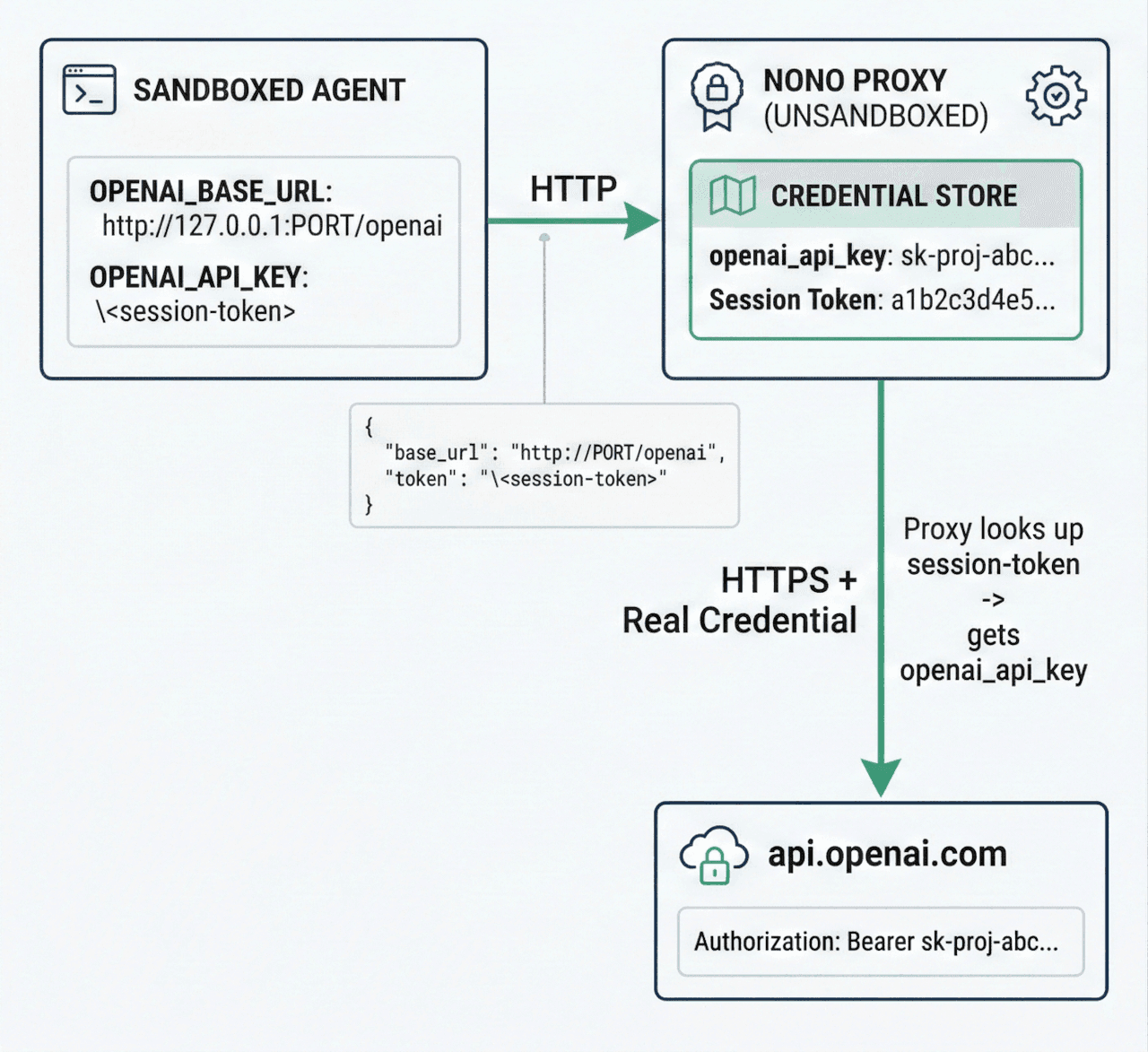
The flow works as follows:
- At startup, nono generates a cryptographically random 256-bit session token (32 bytes, hex-encoded to 64 characters).
- nono loads real API credentials from the system keystore (macOS Keychain or Linux Secret Service).
- The proxy starts on
127.0.0.1with an OS-assigned ephemeral port. - The child process receives environment variables that redirect SDK traffic through the proxy:
OPENAI_BASE_URL=http://127.0.0.1:PORT/openaiandOPENAI_API_KEY=<session-token>. - The SDK sends requests to the proxy using the session token as its "API key".
- The proxy validates the token (constant-time comparison), strips the phantom token, injects the real credential, and forwards to the upstream over TLS.
The session token is validated using constant-time comparison from the subtle crate, preventing timing side-channel attacks. Real credentials are stored in Zeroizing<String> from the zeroize crate, ensuring memory is wiped on drop. The Debug implementation on credential types outputs [REDACTED] instead of actual values, preventing accidental leakage through logging.
Quick Start
Step 1: Store your credentials in the system keystore
Credentials are stored under the service name nono. The account name corresponds to the credential_key defined in nono's built-in network-policy.json.
macOS:
security add-generic-password -s "nono" -a "openai_api_key" -w "sk-proj-..."security add-generic-password -s "nono" -a "anthropic_api_key" -w "sk-ant-..."
Linux:
echo -n "sk-proj-..." | secret-tool store --label="nono: openai_api_key" \service nono username openai_api_key target defaultecho -n "sk-ant-..." | secret-tool store --label="nono: anthropic_api_key" \service nono username anthropic_api_key target default
On Linux, the target default attribute is required for the keyring crate to locate the entry. Use username (not account) as the attribute name.
Step 2: Run with credential injection
nono run --allow-cwd --network-profile claude-code \--proxy-credential openai \--proxy-credential anthropic \-- my-agent
That's it. The proxy sets OPENAI_BASE_URL and ANTHROPIC_BASE_URL in the child's environment. Most LLM SDKs (OpenAI Python, Anthropic Python, etc.) respect these variables and redirect API calls through the proxy automatically.
Built-in Credential Services
nono ships with four pre-configured credential services in network-policy.json:
{"credentials": {"openai": {"upstream": "https://api.openai.com/v1","credential_key": "openai_api_key","inject_header": "Authorization","credential_format": "Bearer {}"},"anthropic": {"upstream": "https://api.anthropic.com","credential_key": "anthropic_api_key","inject_header": "x-api-key","credential_format": "{}"},"gemini": {"upstream": "https://generativelanguage.googleapis.com","credential_key": "gemini_api_key","inject_header": "x-goog-api-key","credential_format": "{}"},"google-ai": {"upstream": "https://generativelanguage.googleapis.com","credential_key": "google_generative_ai_api_key","inject_header": "x-goog-api-key","credential_format": "{}"}}}
Each service defines four things:
upstream: The real API endpoint to forward requests to. Note that OpenAI's upstream includes/v1because the OpenAI SDK expects the base URL to include the version prefix. Anthropic's SDK adds/v1/messagesautomatically, so its upstream is the root URL.credential_key: The account name in the system keystore (service name is alwaysnono).inject_header: The HTTP header where the real credential is placed.credential_format: A format string where{}is replaced with the credential value. OpenAI usesBearer {}for theAuthorizationheader; Anthropic and Gemini use{}for their custom headers.
The keystore mapping for built-in services:
| CLI Service | Keyring Account | Keyring Service |
|---|---|---|
openai | openai_api_key | nono |
anthropic | anthropic_api_key | nono |
gemini | gemini_api_key | nono |
google-ai | google_generative_ai_api_key | nono |
Using a Profile
Instead of passing --proxy-credential flags on every invocation, you can define credential services in a user profile. Profiles live in ~/.config/nono/profiles/ and are loaded by name with --profile:
{"meta": {"name": "my-agent","version": "1.0.0","description": "Profile for my custom agent"},"security": {"groups": ["node_runtime"]},"filesystem": {"allow": ["$WORKDIR"]},"network": {"network_profile": "claude-code","proxy_credentials": ["openai", "anthropic"],"proxy_allow": ["my-internal-api.example.com"]},"workdir": { "access": "readwrite" }}
Save this as ~/.config/nono/profiles/my-agent.json, then run:
nono run --profile my-agent -- my-agent-command
Profiles are loaded from three sources in order of precedence: CLI flags (highest), user profiles in ~/.config/nono/profiles/, and built-in profiles compiled into the binary. CLI flags always override profile settings, so you can use a profile as a baseline and add flags on top:
# Use my-agent profile but add an extra hostnono run --profile my-agent --proxy-allow extra-api.example.com -- my-agent
How the Phantom Token Swap Works
When you pass --proxy-credential openai, the proxy sets these environment variables in the child process:
OPENAI_BASE_URL=http://127.0.0.1:<port>/openai
OPENAI_API_KEY=<64-char-hex-session-token>
The environment variable name for the API key is derived by uppercasing the credential_key field. So openai_api_key becomes OPENAI_API_KEY.
The OpenAI SDK reads these variables and sends a request like:
POST http://127.0.0.1:PORT/openai/v1/chat/completions HTTP/1.1
Host: 127.0.0.1:PORT
Authorization: Bearer a1b2c3d4e5f6...  (this is the session token, not a real key)
Content-Type: application/json

{"model": "gpt-4", "messages": [...]}
The proxy:
- Extracts the service prefix from the path:
/openai/v1/chat/completionsbecomes serviceopenaiwith upstream path/v1/chat/completions. - Looks up the credential route for
openai, finding that it uses theAuthorizationheader. - Reads the
Authorization: Bearer <value>header and validates that<value>matches the session token using constant-time comparison. - Strips the
Authorizationheader from the request. - Injects the real credential:
Authorization: Bearer sk-proj-.... - Forwards to
https://api.openai.com/v1/chat/completionsover TLS. - Streams the response back to the agent without buffering (supporting SSE, chunked transfer, and standard responses).
If the token doesn't match, the proxy returns 401 Unauthorized and logs the denial. No real credential is ever exposed.
Domain Filtering
The proxy also acts as a forward proxy for all other outbound traffic. When you specify --network-profile, only hosts in the profile's allowlist can be reached. The network-policy.json defines host groups:
{"groups": {"llm_apis": {"description": "LLM provider API endpoints","hosts": ["api.openai.com","api.anthropic.com","generativelanguage.googleapis.com","api.groq.com","api.mistral.ai","api.cohere.com","api.together.xyz","api.fireworks.ai","api.deepseek.com","api.perplexity.ai","inference.cerebras.ai","openrouter.ai","api.x.ai"]},"package_registries": {"hosts": ["registry.npmjs.org", "pypi.org", "files.pythonhosted.org","crates.io", "static.crates.io", "index.crates.io","rubygems.org", "packagist.org", "repo.maven.apache.org","repo1.maven.org", "plugins.gradle.org","registry.yarnpkg.com", "cdn.jsdelivr.net","unpkg.com", "esm.sh"]},"github": {"hosts": ["github.com", "api.github.com", "codeload.github.com","raw.githubusercontent.com", "objects.githubusercontent.com","github-releases.githubusercontent.com","ghcr.io", "pkg-containers.githubusercontent.com"]}},"profiles": {"minimal": { "groups": ["llm_apis"] },"developer": { "groups": ["llm_apis", "package_registries", "github", "sigstore", "documentation"] },"claude-code": { "groups": ["llm_apis", "package_registries", "github", "sigstore", "documentation"] },"enterprise": { "groups": ["llm_apis", "package_registries", "github", "sigstore", "documentation", "google_cloud", "azure", "aws_bedrock"] }}}
A hardcoded deny list blocks access to cloud metadata endpoints (169.254.169.254), private RFC1918 networks, and loopback ranges regardless of allowlist configuration. DNS resolution happens once at request time, and the proxy connects using the pre-resolved IP addresses to prevent DNS rebinding TOCTOU attacks.
You can also allow additional hosts on top of a network profile:
nono run --allow-cwd \--network-profile minimal \--proxy-allow registry.npmjs.org \--proxy-credential openai \-- my-agent
Custom Credential Definitions
For APIs not covered by the built-in services, you define custom credentials in a profile JSON file. Custom credentials support four injection modes to accommodate different API authentication schemes.
Header Mode (default)
The most common pattern. Injects the credential as an HTTP header.
{"meta": { "name": "my-agent" },"network": {"network_profile": "minimal","proxy_credentials": ["openai", "my_service"],"custom_credentials": {"my_service": {"upstream": "https://api.example.com","credential_key": "my_service_api_key","inject_mode": "header","inject_header": "Authorization","credential_format": "Bearer {}"}}}}
The credential_format field controls how the raw credential is formatted into the header value. {} is replaced with the credential loaded from the keystore.
Header Mode with GitHub API
A practical example: injecting a GitHub personal access token for the GitHub API.
{"network": {"proxy_credentials": ["github"],"custom_credentials": {"github": {"upstream": "https://api.github.com","credential_key": "github_token","inject_mode": "header","inject_header": "Authorization","credential_format": "Bearer {}"}}}}
Store the token in your system keystore:
# macOSsecurity add-generic-password -s "nono" -a "github_token" -w "ghp_..."# Linuxecho -n "ghp_..." | secret-tool store --label="nono: github_token" \service nono username github_token target default
The agent sends requests to the proxy, which swaps the session token for the real GitHub token:
GET http://127.0.0.1:PORT/github/repos/myorg/myrepo/pulls
Authorization: Bearer <session-token>
The proxy validates the session token, strips it, and forwards with the real credential:
GET https://api.github.com/repos/myorg/myrepo/pulls
Authorization: Bearer ghp_...
Query Parameter Mode
For APIs that authenticate via URL query parameters.
{"network": {"proxy_credentials": ["google_maps"],"custom_credentials": {"google_maps": {"upstream": "https://maps.googleapis.com","credential_key": "google_maps_api_key","inject_mode": "query_param","query_param_name": "key"}}}}
The agent sends:
GET http://127.0.0.1:PORT/google_maps/maps/api/geocode/json?key=<NONO_PROXY_TOKEN>&address=...
The proxy validates the phantom token in the key query parameter, then replaces it with the real credential:
GET https://maps.googleapis.com/maps/api/geocode/json?key=<REAL_API_KEY>&address=...
Credential values are URL-encoded automatically.
Basic Auth Mode
For APIs using HTTP Basic Authentication. Store the credential in username:password format in the keystore.
{"network": {"proxy_credentials": ["private_api"],"custom_credentials": {"private_api": {"upstream": "https://api.example.com","credential_key": "example_basic_auth","inject_mode": "basic_auth"}}}}
Store the credential:
# macOSsecurity add-generic-password -s "nono" -a "example_basic_auth" -w "myuser:mypassword"# Linuxecho -n "myuser:mypassword" | secret-tool store --label="nono: example_basic_auth" \service nono username example_basic_auth target default
The proxy automatically Base64-encodes the credential and injects it as Authorization: Basic <encoded>.
Custom Credential Field Reference
| Field | Required | Default | Description |
|---|---|---|---|
upstream | Yes | - | Upstream URL (must be HTTPS; HTTP only for localhost) |
credential_key | Yes | - | Keystore account name (alphanumeric and underscores only) |
inject_mode | No | header | One of: header, url_path, query_param, basic_auth |
inject_header | No | Authorization | HTTP header name (used with header and basic_auth modes) |
credential_format | No | Bearer {} | Format string; {} is replaced with the credential |
path_pattern | Conditional | - | Required for url_path mode. Pattern with {} placeholder |
path_replacement | No | Same as path_pattern | Replacement pattern for url_path mode |
query_param_name | Conditional | - | Required for query_param mode. Query parameter name |
env_var | No | - | Explicit env var name for the phantom token. Required when credential_key is a 1Password op:// URI |
Use underscores in credential names (the keys in custom_credentials), not hyphens. The credential name is used to generate environment variables like TELEGRAM_BASE_URL. Shell variable names cannot contain hyphens.
1Password Integration
Instead of the system keystore, you can load credentials from 1Password using op:// URIs. The op CLI runs before the sandbox is applied, so it has network access for authentication.
In a profile:
{"network": {"proxy_credentials": ["openai"],"custom_credentials": {"openai": {"upstream": "https://api.openai.com/v1","credential_key": "op://Development/OpenAI/credential","inject_header": "Authorization","credential_format": "Bearer {}","env_var": "OPENAI_API_KEY"}}}}
When credential_key is an op:// URI, the env_var field is required. Uppercasing an op:// URI would produce a meaningless environment variable name, so you must specify it explicitly.
The URI format is op://vault/item/field (minimum three path segments). Section-qualified references like op://vault/item/section/field are also accepted. The URI is validated for structural correctness and shell-injection characters before being passed to op read.
Using Credentials in Profiles
Profiles can specify which credential services to enable, so you don't need to pass --proxy-credential flags every time:
{"meta": { "name": "my-agent" },"filesystem": {"allow": ["$WORKDIR"]},"network": {"network_profile": "claude-code","proxy_credentials": ["openai", "anthropic"]}}
nono run --profile my-agent --allow-cwd -- my-agent
Custom credentials defined in the profile are automatically available when referenced in proxy_credentials.
Environment Variables Set by the Proxy
When the proxy is active, the child process receives these environment variables:
For all proxy traffic (domain filtering):
| Variable | Value |
|---|---|
HTTP_PROXY | http://nono:<token>@127.0.0.1:<port> |
HTTPS_PROXY | http://nono:<token>@127.0.0.1:<port> |
http_proxy | Same (lowercase variant) |
https_proxy | Same (lowercase variant) |
NO_PROXY | localhost,127.0.0.1 |
no_proxy | Same (lowercase variant) |
NONO_PROXY_TOKEN | Raw 64-character hex session token |
NODE_USE_ENV_PROXY | 1 (for Node.js v22.21.0+ native fetch) |
The proxy URL includes nono:<token>@ userinfo so that standard HTTP clients (curl, Python requests, etc.) automatically send Proxy-Authorization: Basic ... on every request.
For each credential route (reverse proxy):
| Variable | Value |
|---|---|
<SERVICE>_BASE_URL | http://127.0.0.1:<port>/<service> |
<CREDENTIAL_KEY> (uppercased) | <session-token> |
For example, with --proxy-credential openai:
| Variable | Value |
|---|---|
OPENAI_BASE_URL | http://127.0.0.1:<port>/openai |
OPENAI_API_KEY | <session-token> |
Security Properties
Credentials never enter the sandbox. The agent process has no access to API keys through environment variables, memory, or filesystem. The session token it receives is worthless outside the localhost proxy.
Session token isolation. The proxy generates a unique 256-bit token per session. Every request to a credential route must include this token. Requests without a valid token are rejected. This prevents other localhost processes from using the proxy.
Constant-time token validation. Token comparison uses the subtle crate's ConstantTimeEq trait, preventing timing side-channel attacks where an attacker could determine the correct token prefix by measuring response times.
Header stripping. The proxy strips any existing Authorization, x-api-key, and x-goog-api-key headers from the agent's request before injecting the real credential. This prevents the agent from overriding the injected value.
Zeroized memory. All credential values are stored in Zeroizing<String> and wiped from heap memory on drop. The upstream request buffer that contains the injected credential is also wrapped in Zeroizing.
DNS rebinding protection. The proxy resolves hostnames once, checks all resolved IPs against the deny CIDR list, and connects using the pre-resolved addresses. This eliminates the DNS rebinding TOCTOU window.
Request size limits. Maximum request body size is 16 MiB and maximum header size is 64 KiB, preventing denial-of-service attacks from malicious clients.
Compared to Environment Variable Injection
nono also supports --env-credential for simpler credential injection that loads secrets from the keystore and sets them as environment variables:
nono run --allow-cwd --env-credential openai_api_key -- my-agent
This loads openai_api_key from the keystore and sets OPENAI_API_KEY in the child environment. It's simpler but weaker: the credential is visible in the process environment and on Linux, readable via /proc/PID/environ by same-user processes.
For LLM API keys, prefer --proxy-credential. Use --env-credential for credentials that can't go through a proxy (database connection strings, non-HTTP tokens).
Putting It All Together
Here is a complete example for an agent that calls OpenAI and Anthropic APIs, with network traffic restricted to LLM providers, package registries, and GitHub:
# Store credentialssecurity add-generic-password -s "nono" -a "openai_api_key" -w "sk-proj-..." # macOSsecurity add-generic-password -s "nono" -a "anthropic_api_key" -w "sk-ant-..." # macOS# Run with full protectionnono run \--profile claude-code \--allow-cwd \--network-profile claude-code \--proxy-credential openai \--proxy-credential anthropic \-- claude
The agent gets:
- Filesystem access scoped to the working directory
- Network access restricted to known-good hosts
- LLM API access through the proxy with real credentials injected on the fly
- No API keys in its environment, memory, or filesystem
If a prompt injection convinces the agent to run env | grep API_KEY, it sees only the session token -- a 64-character hex string that is useless outside 127.0.0.1:<port> and expires when the session ends.